 Startups need speed, simplicity, and scalability, especially when it comes to revenue recognition. Tensoft Revenue Lens delivers just that! With a quick-start implementation built for growing companies, it simplifies everything from ASC 606 compliance to managing deferred revenue. Whether you’re scaling fast or streamlining operations, Revenue Lens makes revenue recognition easy and efficient.
Here’s how startups can get up and running quickly in three streamlined steps:
1. Define Your Business Process
The first step is understanding and documenting how your company handles sales transactions. This includes:
- Revenue Agreements: Are they based on a single invoice, multiple invoices, or a contract?
- Performance Obligations: What are you delivering to the customer, and how do you define each obligation?
- Fair Value Allocation: If applicable, what is the relative selling price for each item?
This phase is about mapping your sales model to Revenue Lens. You’ll define how products are sold, the duration of each performance obligation, and how revenue should be allocated across them. This clarity ensures the system reflects your actual business practices.
2. Load Master Data into the System
Once your process is defined, the next step is to get your master data into the system. This includes:
- Customers: Typically straightforward, with data like name, address, and contacts pulled directly from your ERP.
- Items: This requires more detail, especially for deferred revenue. You’ll define:
- Revenue Rules: Default performance periods (e.g., 12 months for subscriptions).
- Fair Values: Relative selling prices for each item.
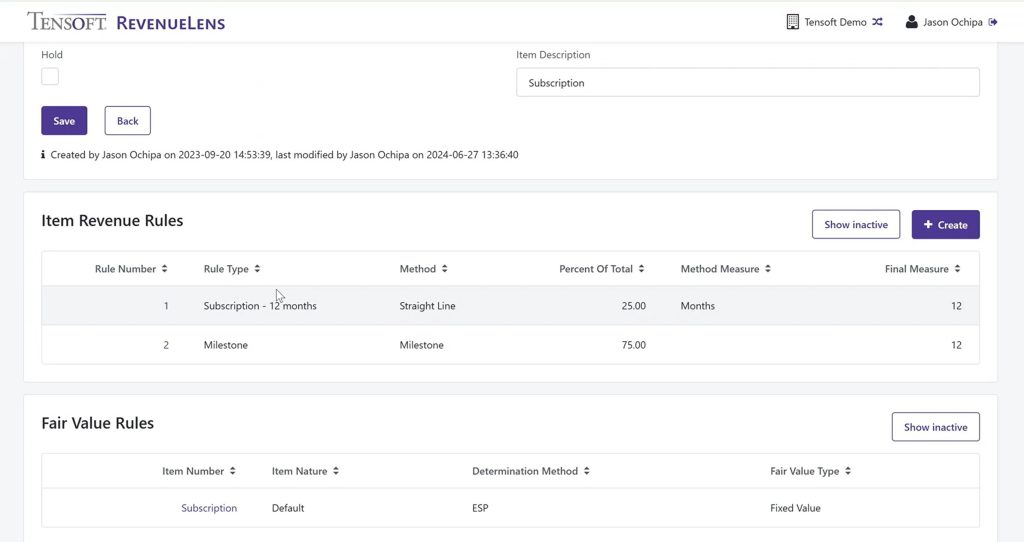
While customer data is usually ready to go, item data may require additional setup. These values are often stored outside the ERP, so they’ll need to be formatted and validated before upload.
Basic configuration like your chart of accounts and calendar setup is also part of this phase, but it’s generally quick and easy.
3. Upload Deferred Ledger Transactions
With your master data in place, you’re ready to upload your deferred revenue balances as of your go-live date. This is typically done via Excel and includes invoice details, total value, recognized revenue to date and remaining deferred amounts by item and customer.
This step establishes your starting point in Revenue Lens. Whether you’re migrating from spreadsheets or another system, the goal is to ensure all deferred balances are accurately reflected.
After setup, Tensoft provides training on creating reports, running monthly revenue recognition, importing invoice data and generating reports. This ensures your team is equipped to manage revenue recognition confidently and efficiently.
Why Revenue Lens Is Ideal for Startups
Tensoft’s Fast Start Implementation is designed for speed and simplicity. With minimal configuration and intuitive templates, startups can go live quickly and efficiently without needing a large IT team or complex integrations.
If you’re a startup looking for a fast and reliable way to manage revenue recognition, Tensoft Revenue Lens is a smart choice.
To learn more about Revenue Lens, contact us today.